How SMS consent works
Hyrr Platform Inc. operates the hiring platform at hyrr.ai. Employers use it to interview and hire. This page describes, in full, who consents to receive text messages from Hyrr, where that consent is given, and what gates every send.
1. Who gives consent, and where
Consent is given by the candidate to the employer, during that employer’s own application and recruitment process — on the employer’s job application form, or in the employer’s applicant tracking or HR system (Workday, BambooHR, Greenhouse and similar). The candidate provides their phone number there and agrees to be contacted about their application.
Hyrr does not collect phone numbers or messaging consent from candidates directly. Hyrr is the employer’s service provider: it sends on the employer’s behalf, to people who already have an active application with that employer. There is no list, no purchased data, and no messaging to anyone who has not applied.
Consent is never a condition of applying for a job. A candidate who declines SMS still receives everything by email.
2. The employer confirms that consent to Hyrr
Before Hyrr will send a single text message for an organization, an administrator of that organization must tick a written attestation in Hyrr’s Organization settings, confirming the organization holds candidate consent. The setting is off by default and the code fails closed: no attestation on record means no SMS is sent, for any candidate, under any circumstances.
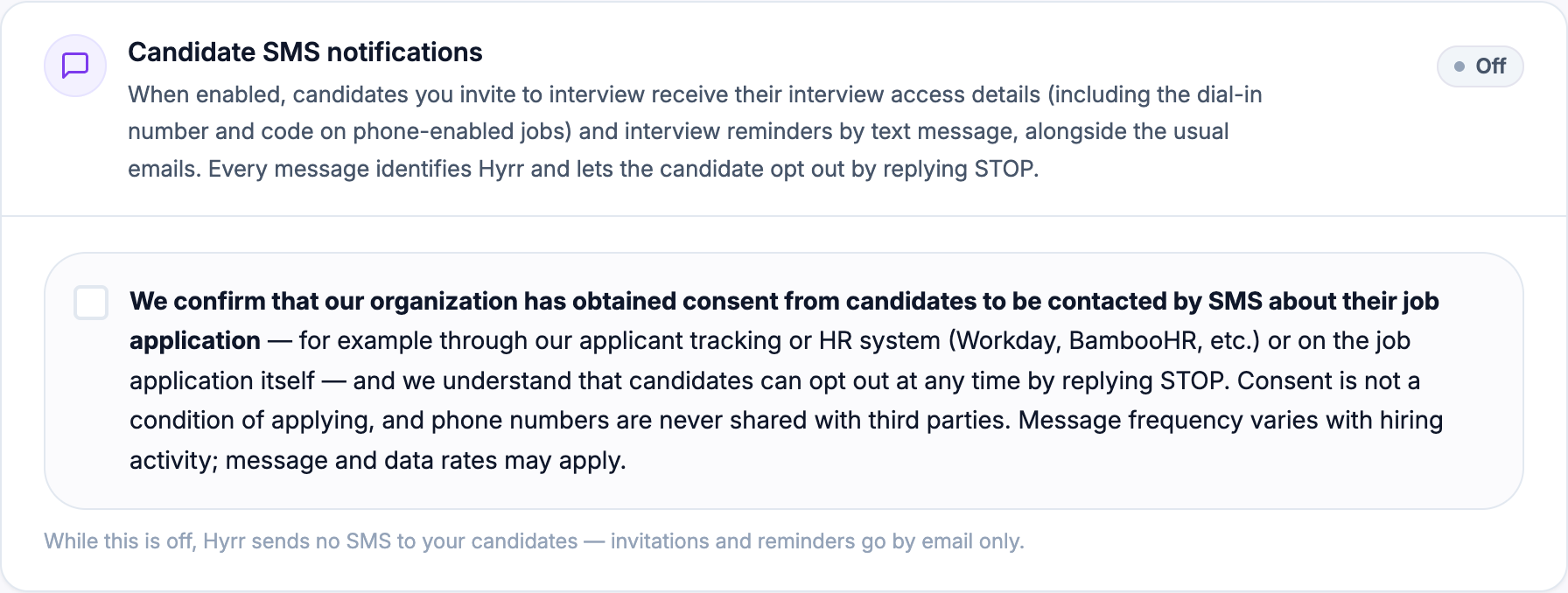
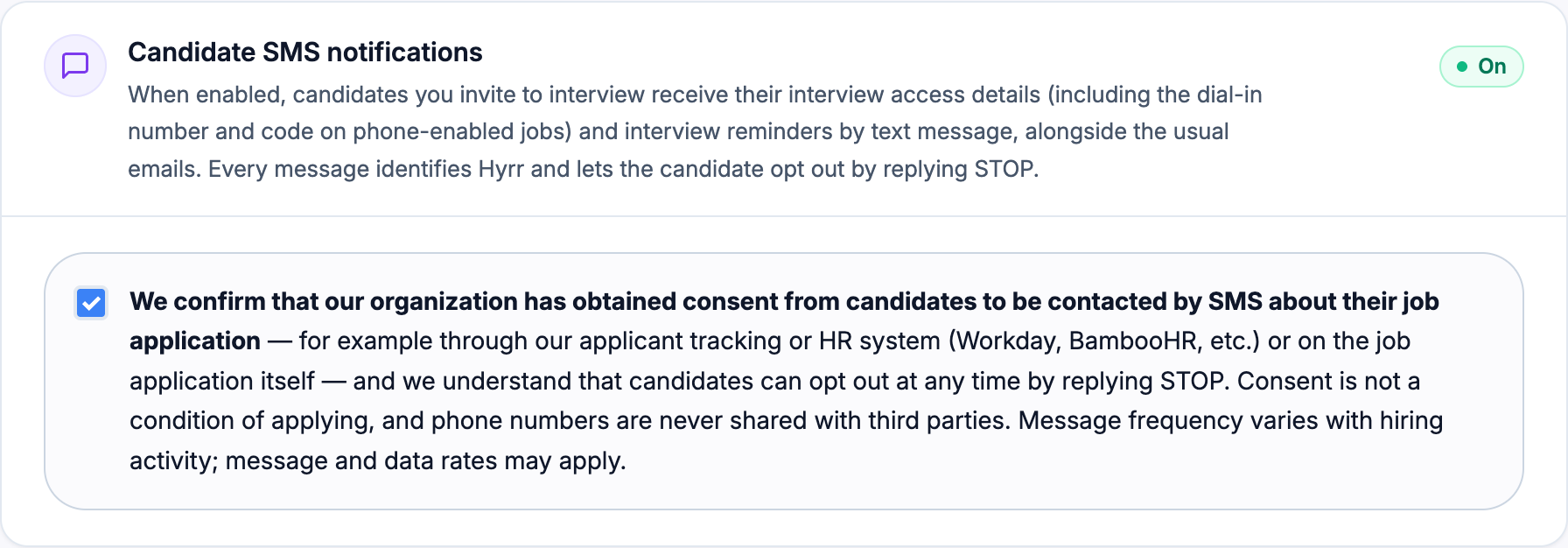
Beneath the confirmation, the employer chooses which of the messages below it actually wants sent; invitations to apply are off unless an employer turns them on. The wording of the attestation, exactly as it appears in the product:
“We confirm that our organization has obtained consent from the candidates we invite to a job, or who apply for one, to be contacted by SMS about that job — for example through our applicant tracking or HR system (Workday, BambooHR, etc.) or on the job application itself — and we understand that candidates can opt out at any time by replying STOP. Consent is not a condition of applying, and phone numbers are never shared with third parties. Message frequency varies with hiring activity; message and data rates may apply.”
3. What Hyrr actually sends
Three messages, each about a job the candidate has been invited to or applied for, and each duplicating an email sent at the same moment. The email carries the full detail; the text carries the access details so the candidate can start the interview from the phone it arrived on. Hyrr sends no promotional or marketing SMS of any kind.
Invitation to apply — sent once, when an employer invites the candidate to a job:
Hyrr: Hi [First Name], [Employer] invited you to apply for [Job Title]: https://hyrr.ai/job/[Code]
The same link is in your email.
Reply STOP to opt out, HELP for help.
Interview invitation — sent once, when the employer dispatches the interview:
Hyrr: Hi [First Name], [Employer] has invited you to an AI interview for [Job Title]. Start in your browser: https://hyrr.ai/candidate-portal/application/[Application ID]
Or by phone: tap tel:+18333599263,,,[12345678] to dial with your code entered, or call +1 833 359 9263 and enter [1234 5678].
Reply STOP to opt out, HELP for help.
Interview reminder — sent only while that invitation is still open and unused:
Hyrr: Reminder - your interview for [Job Title] at [Employer] is still waiting. Start: https://hyrr.ai/candidate-portal/application/[Application ID]
Or by phone: tap tel:+18333599263,,,[12345678], or call +1 833 359 9263 and enter [1234 5678].
Reply STOP to opt out, HELP for help.
Message frequency varies with hiring activity, up to 4 messages per interview invitation: the interview invitation and up to three reminders, plus one message if the employer invited the candidate to the job in the first place. Words in square brackets above are filled in for each candidate, and the tel: link dials the interview line and enters the code for the candidate. Where the employer has not enabled interviews by telephone there is no number to call: both messages instead say the interview needs a laptop or desktop, and carry the link. Message and data rates may apply.
4. Opting out, and getting help
- STOP — reply STOP to any message to stop all further texts immediately. STOP, STOPALL, UNSUBSCRIBE, CANCEL, END, QUIT, OPTOUT and REVOKE are all honoured. A confirmation is returned and nothing further is sent; reply START to resume.
- HELP — reply HELP or INFO to any message for assistance and contact details.
- A candidate may also ask the employer to remove their number, or contact Hyrr at support@hyrr.ai, and it will be removed.
- Opting out of SMS never affects an application. Everything continues by email.
5. What Hyrr does not do
- We do not sell or share your SMS opt-in data or personal information with third parties for marketing purposes.
- No marketing, promotional, or advertising messages are sent by SMS.
- No messages are sent to anyone without an active application with the sending employer.
- No numbers are sourced from purchased lists or third-party data providers for messaging.
- SMS is never a requirement of applying for, or being considered for, a job.
6. More detail
How Hyrr handles personal data generally, including phone numbers, is set out in the Privacy Policy (section 3 covers SMS specifically) and the Terms of Service (section 13 covers text messages). Questions about messaging can go to support@hyrr.ai.